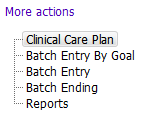

The Clinical Care Plan (CCP) is a tool within PARIS for documenting and sharing of information regarding a client’s needs, goals, and interventions. It supports users in efficient documentation and retrieval of relevant information, supporting better care planning, coordination, and communication for the client.
There are four forms in Clinical Care Plan Application on the left. The main Clinical Care Plan form is used to enter individual Needs & Goals and Interventions. It also provides the summary and detailed view of a client’s care plan, including group and casenote information. This section describes how to use the main Clinical Care Plan form.

The Relevant Information section provides a read only display of client information entered from elsewhere in Paris. Information includes:
- Care plan contact: (Entered from Allocations). This field may be used when a client is involved with multiple teams from various programs to help clarify roles.
- GP/NP: This is the same provider as entered in the GP/NP field in Central Index – Personal Details
- Pharmacy(s): This field displays the last 2 pharmacies entered into the External Agencies/Other Professionals grid
- Care plan last updated: This field displays the name and date of the person who last updated any part of the client’s care plan

The Active Care Plan Summary provides a simple, comprehensive, and summarized view of all active care plan components across all teams and disciplines. It is a read only display in a grid view format. Components are grouped distinctly by Need, and show all of the types of Goals and Interventions associated with a Need, including the Disciplines, Teams, and Programs involved.
See Need Summary Report.

See Care Plan Filters.

This grid lists each Need and Goal identified for the client. The last two columns display the Program and Team supporting the client's goal.
Locate a Care Plan component using Care Plan Filters

This grid displays all Interventions that are part of the client's Clinical Care Plan. You see the Program, Team and Discipline for each Intervention as well as the Start Date and Details that may be entered for the Intervention.
Create and Link an Intervention

This grid is autopopulated and shows all the Client's Group Memberships.

This grid shows recent casenotes written, up to the most recent 100 records. You see which Need & Goals the casenote is linked to by looking under the Needs and Goals columns. When the Needs and Goals columns are blank, the casenote is not linked to a Care Plan Component.