Set Review Date for a Goal
Create and Update a To Be Determined Goal
1. To create a Need & Goal record on the Clinical Care Plan form, expand the Needs & Goals section.
2. Click Insert a Row and the 'Needs & goals- entry' window appears. NOTE: If you are member of more than one team, the Owner key lookup window appears. Select the team associated with the Need & Goal. If you are only a member of one team, then the owning team is defaulted into the Needs & Goals entry form.
3. You will need to enter the following fields:
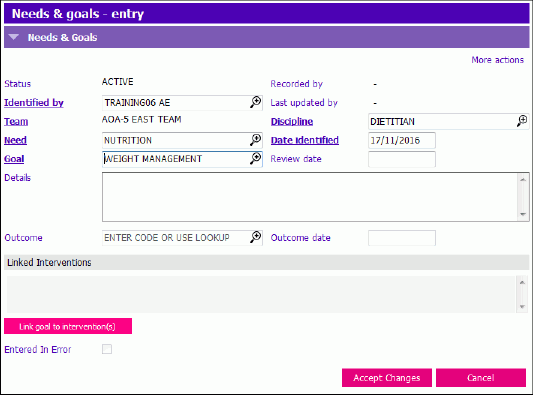
- Need: Select a Need from the lookup
- Goal: Select a Goal from the lookup
- Review Date: This is an optional date field (see Set Review Date for a Goal below).
- Details: This is an optional unlimited free text field used to enter details regarding the goal being worked on from the client's perspective.
- Discipline: Autopopulated but can be changed
- Date Identified: Defaulted to the date the entry is being created but may be back-dated to the actual day identified.
4. If the Intervention you want was already created, click Link goal to intervention(s) button to link the new Goal to one or more existing Interventions.
5. Click Accept Changes and save the Clinical care Plan.
The new Goal record will now exist in the Needs & Goals grid section and will have a status of ACTIVE, indicating it does not yet have an outcome recorded. You will also see the Need and Goal in the Active Care Plan Summary grid.
This example shows the Need and Goal create by a Dietitian, is on the same Summary row as a Nutrition Need entered by a nurse.

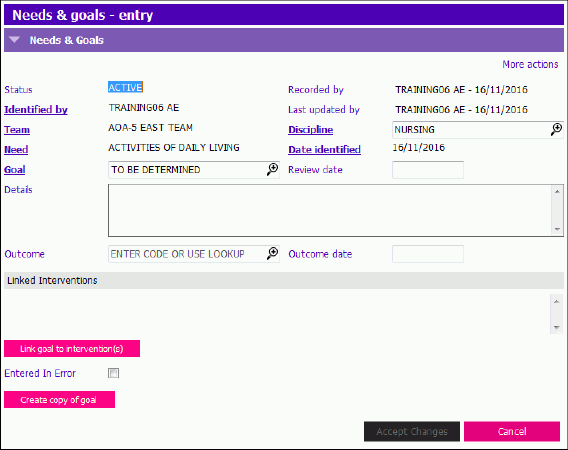
NOTE: After saving the new record all fields are read only except for: Review Date, Details, Outcome, Outcome Date, and Discipline. To Be Determined Goals can also be updated.
Set Review Date for a Goal
Optional review dates can be set for Goals. Programs or disciplines may set different standards for use, (e.g. when a review assessment is scheduled). Review dates can continually be added, modified or removed at any time. The Review date does not trigger a PARIS Notification.
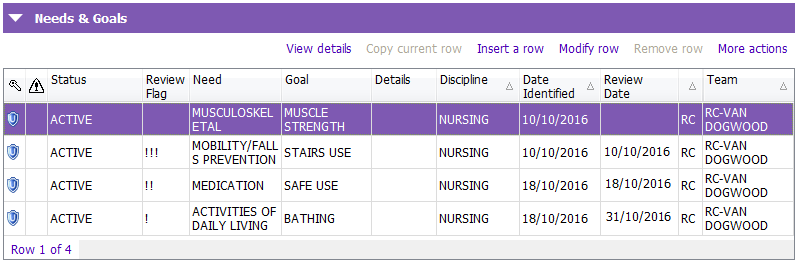
In the Needs & Goals section, there is a Review Flag beside the Status column, which is tied to the Review date of the goal. When a review date for a goal is: approaching, due, or overdue, the column will be automatically populated with one, two, or three ‘!’ to indicate this.
- ‘!’ indicates a review for the goal is approaching within 14 days
- ‘!!’ indicates a review for the goal is due on the current day.
- ‘!!!’ indicates a review for the goal is overdue.
Create a To Be Determined Goal
When a new Need and Goal record is entered, a goal type of ‘TO BE DETERMINED’ can be selected. When this goal type is selected, then the Goal field remains editable, even after the record has been saved. This allows a need that has been identified to be recorded, even if no goal has yet been established.
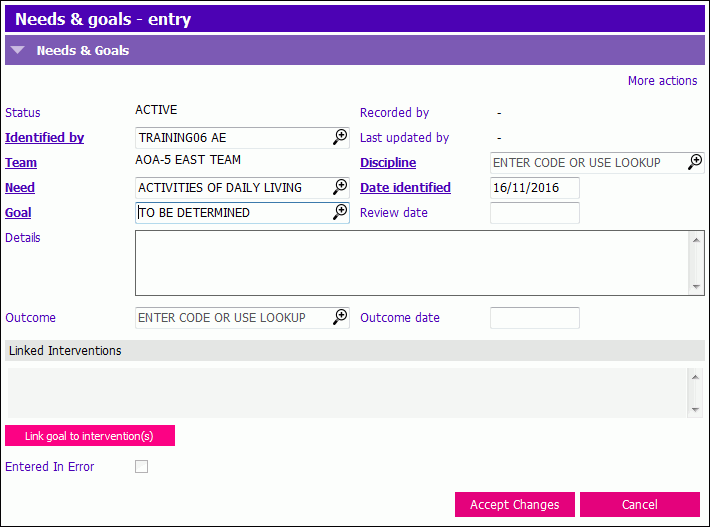
Adding a review date to the Goal of ‘To Be Determined’ can remind clinicians to revisit the plan of care and enter a more specific Goal.
Update a To Be Determined Goal
1. Modify the Goal in the Needs & Goals grid
2. Update the Goal