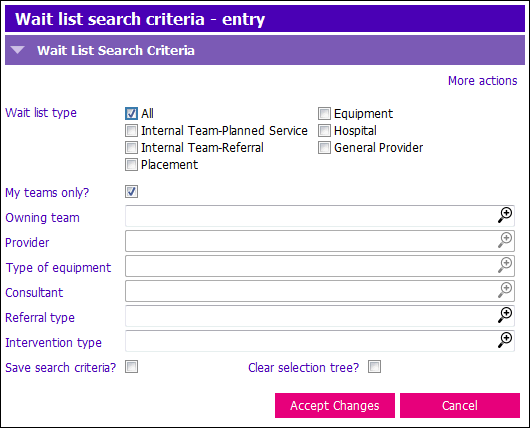
 Best Practice: Click the Save search criteria? tickbox and Accept Changes to avoid this popup in the future.
- You can filter Waitlist clients by any criteria in the above screen. Different tick boxes activate the picklists in the fields below
- The most common search will be by Owning Team
- To enable the Owning Team picklist Untick My teams Only
Select the correct Owning Team
1. Enter tick marks in ‘Save search criteria?’ and ‘Clear selection tree?’ tick boxes
2. Press Enter, the Options Tree now displays Owning Team Waitlist details
To return to your Team display, launch Waitlist Search screen Tick ‘My teams Only?’ tick box
1. Enter tick marks in Save search criteria? and Clear selection tree? tick boxes
2. Press Enter, Options Tree will return to Own Team view