Create Links Between Goals and Interventions
Link Goal to one or more Interventions
Link Intervention to another Goal(s)
Correct Linking Mistakes
Unlink a Need & Goal from an Intervention
Unlink an Intervention from a Goal
Goals are the sub-categories of Needs and answer the question, “what are the desired outcomes?” The Intervention is how the Goal will be met. This link can be created from the Needs & Goals grid or from the Interventions grid.
- A Goal is linked to one or more Interventions. PARIS does not enforce Goals to be linked to any Interventions.
- An Intervention must be linked to at least one Need & Goal. PARIS does enforce that an Intervention is linked to at least one goal.
Create Links Between Goals and Interventions
-
Link Goal to one or more Interventions
To create a link from a Goal to one or more Interventions:
1. Select an existing Goal in the Needs & Goals grid and click the Modify row button, or
Create a new Goal and by clicking the Insert a row button.
2. Click the  button. The Link to interventions window will appear:
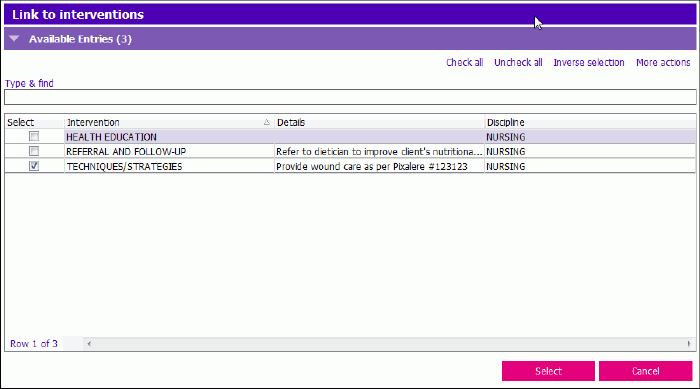 3. Select one or more Goals from the Link to interventions window and click Select. The selected Interventions will display under the Linked Interventions heading.
-
Link Intervention to another Goal(s)
To create a link from an existing Intervention to additional Goals:
1. Select an existing Intervention the from the Interventions grid and click Modify row.
2. Click the Link intervention to goal(s) button.
3. Select one or more Goals from the Link to goals popup.
4. Click Select
The selected Goals will display under the Linked [Need] Goal heading.
Correct Linking Mistakes
In the case of a Goal being linked to an Intervention by mistake, the Goal and Intervention can be unlinked as long as the Intervention is linked to another Goal. These corrections can be made from the Needs & Goals grid or from the Interventions grid.
-
Unlink a Need & Goal from an Intervention
IMPORTANT: This should only be done if the Goal has been linked to the Intervention by mistake, and not when the Goal or Intervention has ended.
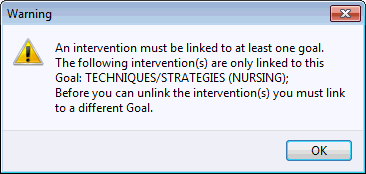
You cannot unlink a Goal from an Intervention if the Intervention is not linked to another Goal.
1. Expand the Needs & Goals section. (You can do this from the Interventions section as well by selecting the incorrect Interventions and following the same steps).
2. Select the incorrect Need & Goal and click Modify row. The 'Needs & goals - entry' window appears.
3. Click the button. The Link to interventions window appears:
4. Deselect the one or more Goals that are incorrect and click select. The deselected Interventions will now be removed from the Linked Interventions field.
NOTE: If you attempt to remove a link that cannot be removed, a message will be displayed.
-
Unlink an Intervention from a Goal
IMPORTANT: This should only be done if the Goal has been linked to the Intervention by mistake, and not when the Goal or Intervention has ended.
You cannot unlink a Goal from an Intervention if the Intervention is not linked to another Goal.
To remove a link from an Intervention to one or more Goals:
1. Select an existing Intervention from the Interventions section and click Modify row.
2. Click the Link intervention to goal(s) button.
3. Deselect one or more Goals from the Link to goals popup.
4. Click Select
The deselected Goals will now be removed from the Linked Goals field.