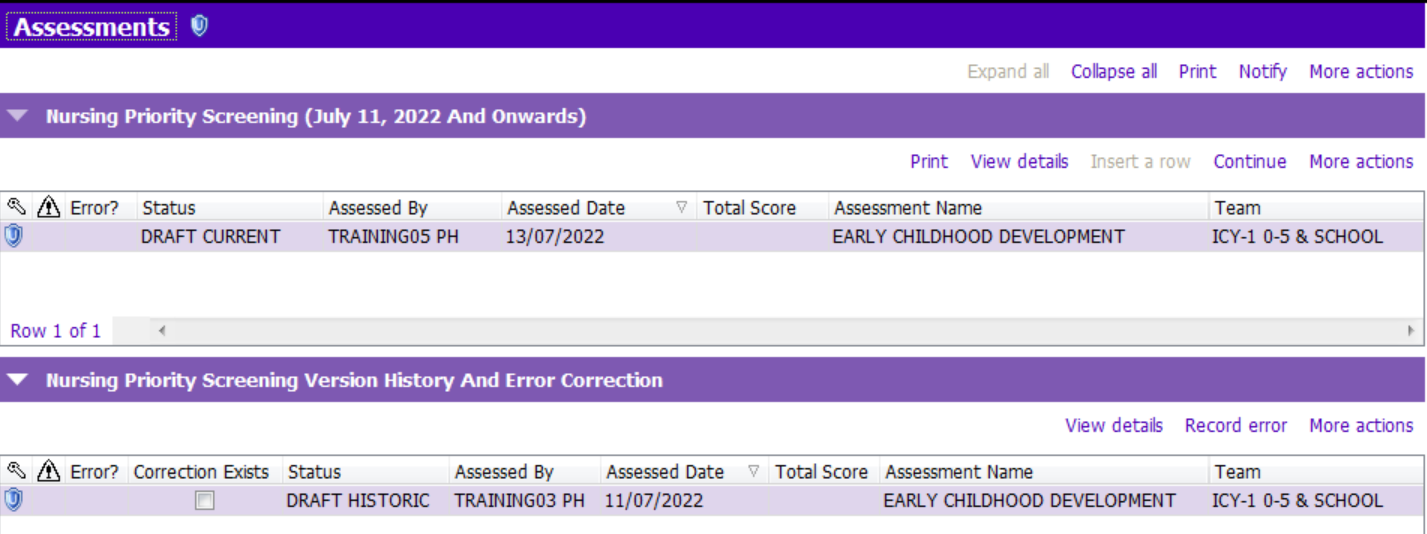
On July 11th, 2022, the version of the Nursing Priority Screening (NPS) Tool was updated. The NPS Tab was also added to Early Childhood Development and Prenatal Assessment. The new NPS tab functions differently than other grid sections in PARIS. Similar to Weight and Growth Chart, Vital Signs and Allergies, each documented screen will be displayed in the three assessments regardless of where the screening is originally recorded. This will allow staff to view all episodes of screening per client in one spot, without toggling to different assessments. There are three sections in the NPS tab.
1. Nursing Priority Screening (July 11th, 2022 And Onwards)
- This section displays the most recent screening that is in progress and/or all completed episodes of screening per client. To identify where each screening was originally entered, the section header has Assessed Date, Assessment Name and Assessment Team.
- Insert a row button will be enabled to allow initiating a new screening tool when there isn’t one already in progress. In this section, you may see screenings that were completed in the past. Refer to Record Screening – Initial entry for more details.
- Continue button will be enabled when there is a screening that is in progress. Refer to Record Screening – subsequent entries for more details.
- To show whether the screening is in progress or completed, the form/row is designated with a field called ‘Status’.
-When the Status field is DRAFT CURRENT, the screening is in progress. The system allows updating the tool until it is marked as final/signed-off.
-When the Status field is FINAL, the screening was signed off as final on the date in the Assessed Date field.
-When the Status field is DISCONTINUED ADMINISTRATIVELY, the screening tool was not finalized. An incomplete tool may be marked as discontinued to allow for a new tool to be entered. This is done when screening is initiated but can not be completed with the client. The date that the tool was discontinued will display on the date in the Assessed Date field.
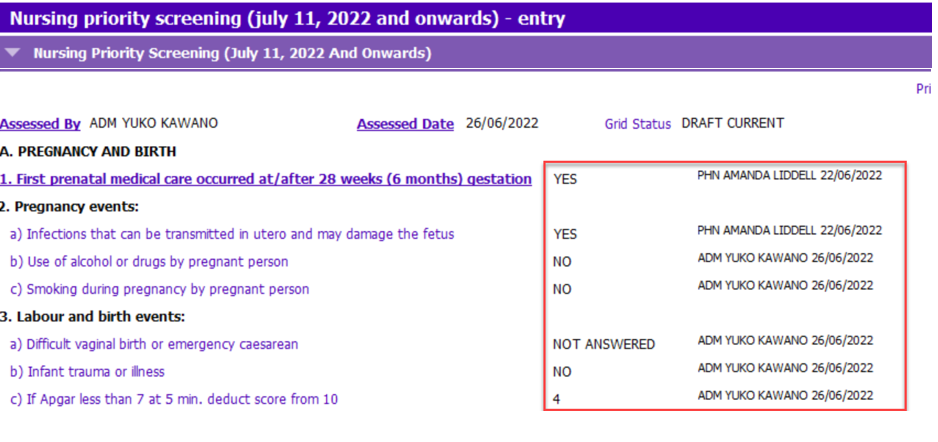
- This section allows continuous charting by multiple nurses on different dates until screening is completed. View details or Continue shows the staff name and the assessed date from the most recent entry per questionnaire. See the screenshot. In this example, the answer YES for Q1 was entered by Amanda on June 22, 2022, and the answer NO for Q 2b) was entered by Yuko on June 26, 2022.
- Print button enables all staff to generate a report of the screening form.
2. Nursing Priority Screening Version History And Error Correction

- Similar to version history of Paris case notes, this section keeps all historic saved versions of the screening form. The most recent version is displayed in the Nursing Priority Screening (July 11th, 2022 And Onwards) section, while previous versions are recorded in the Nursing Priority Screening Version History and Error Correction section as snapshots. If there is more than one row in the Nursing Priority Screening (July 11th, 2022 And Onwards) section, you must highlight the row for which you wish to see the historic saved versions. To show the status of screening when the snapshots were taken, the form/row is designated with a field called ‘Status’.
-When the Status field is DRAFT HISTORIC, it is a snapshot of when the screening was in progress.
-When the Status field is DISCONTINUED ADMINISTRATIVELY, it is a snapshot of when the screening was discontinued.
-When the Status field is UNLOCK FINAL, the screening was marked as final once and then unlocked later. This is a snapshot of when the screening was marked as final.
- Record error button will be enabled when there is a version of the screening tool that is currently in progress. When an erroneous entry was made for the screening, the Record error button will be used. Refer to Error Correction for more details.
- This section remains closed by default. The purpose of the section is for storing historic versions and to allow staff to make error corrections.
3. Nursing Priority Screening (Entered Prior to July 11, 2022 Via Postnatal/Newborn V2)
- This section displays any previous version NPS forms that were entered before July 11th, 2022. These entries will be read-only and no longer editable.