End Staff Involvement - Allocation
End Staff Involvement - Association
Staff are allocated to a referral or associated with referrals when they need access to a client's file. When an allocated or associated staff person is no longer involved with the client the allocation needs to be ended. The way to do this depends on the situation.
- If the service to the client is ending Discharge the referral NOTE: Discharging a Referral ends ALL staff involvement for that referral.
- If the staff providing the service is changing, you will end the allocation; however you should allocate the new person or ensure at least one person is allocated first.
WARNING: The Referral status changes from Allocated to On Hold when the last allocated staff ends their involvement – leaving no staff allocated. If you are the last person on your Team and you end your involvement, Referral status will change to On Hold.
- If staff at your team are no longer providing service to the client, the Referral should be Discharged.
- If an allocation was done in error you need to Mark the Allocation as Entered in Error.
- If an associated staff does not need to access the file anymore, end the association.
End Staff Involvement - Allocation
Allocation can be Ended from a number of places in PARIS
- In the Referral Actions Taken grid
- Involved Staff section in:
- Central Index, Client's Contacts
- Team Caseload
- Allocation / Association
End Allocation from Involved Staff Grid
1. Navigate to the Involved Staff section in one of the following locations:
- Team Caseload
- My Caseload
- Allocation/Association
- Client's Contacts form in Central Index
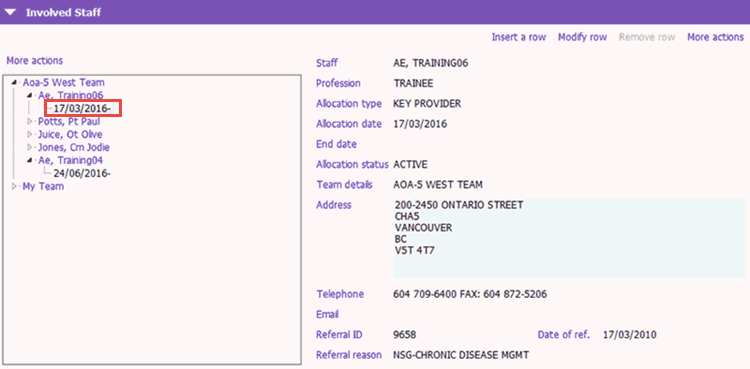
2. Expand the Options Tree by clicking the beside the appropriate Team and Staff member.
3. Select the referral (date) under the Staff you wish to end allocation (e.g. 17/03/2016-)..
4. Click Modify row under the Involved Staff heading.
5. Enter the following fields:
- Date To: Enter the date (dd/mm/yyyy). Remember, you can press Ctrl + T for today's date
- Authorized by: Enter your user name and press tab.
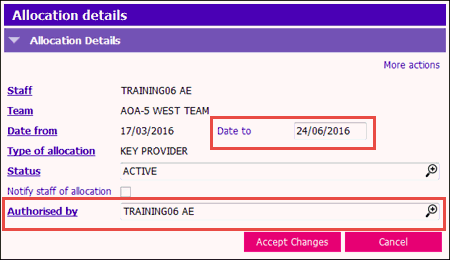
6. Click Accept Changes and Save the form.
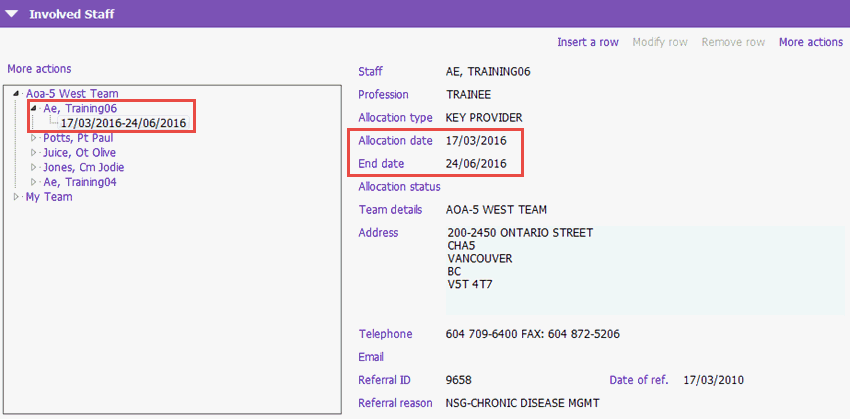
The Involved Staff grid will show the Allocation (start) date and End date for the client's referral. The client will no longer appear in the staff person's caseload.
End Staff Involvement - Association
Best Practice for Ending Association
- If you are no longer involved with the client, end your association.
- If you were the only person or the last person associated, you should either discharge the referral or associate another staff member.
1. Scroll down to the Other Provider Association - View section.
2. Check the Display Other Provider Association? tickbox. 

3. Complete the End Date an Other Provider Association information.
- Association ID: Enter the Association ID for the Team Member whose association will end.
- End Date: The date the association will end
- The End Association tick box will automatically be checked
4. Save the Allocation/Association form.
Note: Associations are automatically end dated if all referrals owned by the associated team are discharged.