Caseload Tab
Groups Tab
Team List Tab


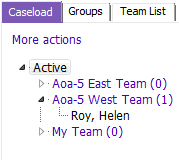
Once a request for service (referral) has been made, it can be found in Outstanding Referrals. Referrals sitting in Outstanding Referrals have not yet been allocated.
Allocate a new referral from Outstanding Referrals on the Team List tab.
View Caseload for any team member on Caseload tab
Re-Allocate On Hold Referrals on Team List
Caseload Tab

Displays all clients allocated to all Team members
1. Click the beside Team name to expand, All Team members display
2. Click the  beside a Team members name, a list of clients allocated to that Team member will display
3. To activate a client, click on a client name
Groups Tab

- Displays Team list & all group clients allocated Team Members
- Expand the list, Click the beside name of the Group to see the list of clients allocated to that group
- Click on the client's name to activate them
- The date the group was started displays after the Group name
Team List Tab

- Client Transferred in: Is not being used at this time
- Help Desk Clients: Is not being used at this time
- On Hold Referrals: Referral status becomes “On Hold” when last allocated person ends involvement.
- Outstanding Authorizations: Is not being used at this time
- Outstanding Referrals: Displays ‘Open on Duty /Screening’ Referrals to the Team, sorted by PARIS ID.