


This section covers commonalities and explains how to use the functionality in Assessments. Assessments must be attached to an open Team Referral.
- Guidelines tell you when and what information should go into your Assessments.
Guidelines are found on the PARIS website.
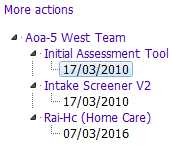
The Assessments application has an Options Tree as shown below. Click More actions and select Expand all levels to view all assessments. See Organizing the Options Tree to change the way the options tree is organized.

All assessments have the Header Details section at the top of the assessment. The Header Details section contains information about the assessment, including Type, Date started, Team, Carried out by, End date, the Assessment ID and Referral ID.
Parts of an Assessment and Assessments Navigation

An assessment can be printed by clicking the  button in the Print Form section.
Related Links
Form Locking
Complete an MDS-RAI Assessment
Organizing the Options Tree