The Home Support Orders application contains all Home Support Orders created in this application.
Previous orders created in the Assessments application will remain viewable from there. Existing home support clients at the time of go-live will have had their most recent Home Support order from the Assessments application migrated to the HSO application.
All current and historic orders are listed in the forms tree within the application. Orders are organized by Responsible Team, and then by Order Status. Statuses are automatically updated by the system.
To view an existing order: From the forms tree on the left, click on a Home Support Order you wish to view.
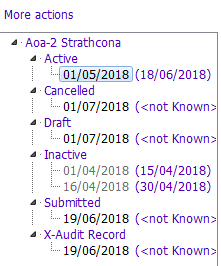
Order Statuses
The table below describes the order statuses:
| Order Status | Definition |
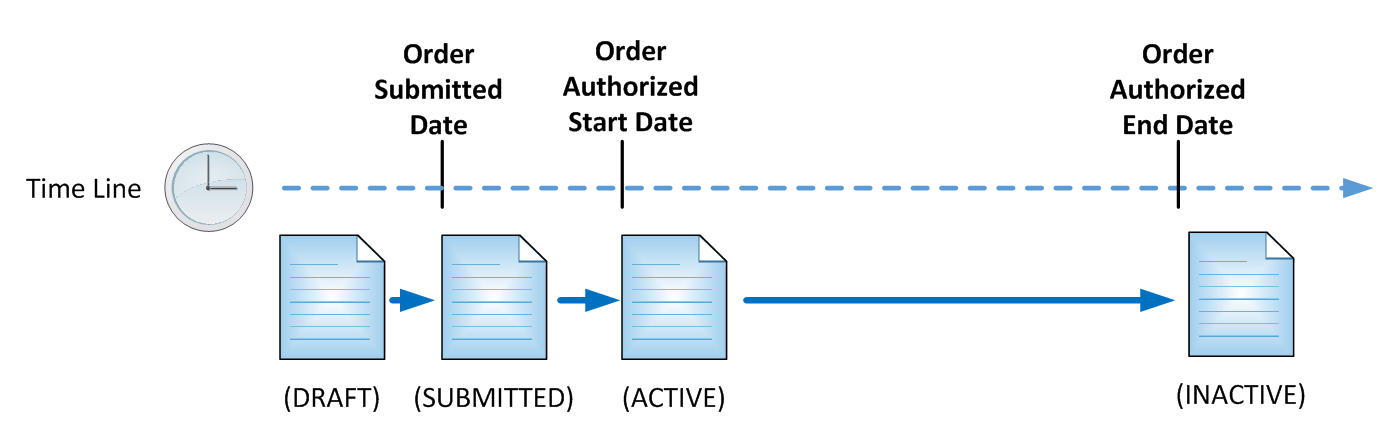
| Draft | The HSO is in a draft state and incomplete. |
| Submitted | The HSO is finalized and submitted to the HS Provider, but service has yet to start (i.e. Authorized Start in the future). |
| Active | The HSO is now active (i.e. Service has been authorized to start). |
| Inactive | The HSO is no longer active and is in the past (i.e. Authorized End is in the past). |
| Cancelled | The HSO has been cancelled. |
| Audit Record | This is an audit record that shows past versions of a submitted order, but only if the order has been edited. |
The diagram below illustrates how a typical order changes statuses over time: