Imms Entry (Ad Hoc) Toolbar Buttons
Enter External Immunization History
Enter Immunizations Given Based on BCCDC Recommended Schedule


This Application displays all planned immunizations and allows the recording of given immunizations. On this page, you can find information on how to enter immunizations given.
The default antigen schedule for clients entered into PARIS under and including the age of 20 is the standard BCCDC Immunization schedule.
Imms Entry (Ad Hoc) Toolbar Buttons
 If a row in Immunization History has been changed this button will be visible. Clicking it will display information about the change. Clicking 'Hide Audit' will hide the changes. Click Audit History article for more information.
 Do not use this application, go to Informed Consent Entry Application to enter consents.
 Toggles to Imms Client Profile Application.
 Run reports.

This section displays all planned immunizations that client is planned for
There are 3 views within this section:
Planned Immunizations buttons enable you to navigate to the different views:
- Show extended view: Displays the same view as current screen, but in a larger format
- Toggle view: Displays single antigen view of history with dose numbers
- Scheduled: Displays antigens that are scheduled as well as antigens that are disallowed

This section displays the immunization histories that have been given. We can add, modify or remove information from this view
There are three ways to enter immunisation history:
- In Antigens [Due] view: For scheduled antigens
- In Show custom antigens view: To enter custom entry. Click Show custom antigens and select antigens to add to the list
- In Show all antigens view: List of all allowed antigens. Click Show all antigens and select given antigens
Enter External Immunization History
Record External History in the Imms Entry (Adhoc) Application
External History is information about antigens given by non-VCH providers. When recording external history you may have limited information. Minimally you must record a date or estimated date and the antigen.
1. Click Insert a row in the Immunisation History section and the 'Immunisation' window will appear:
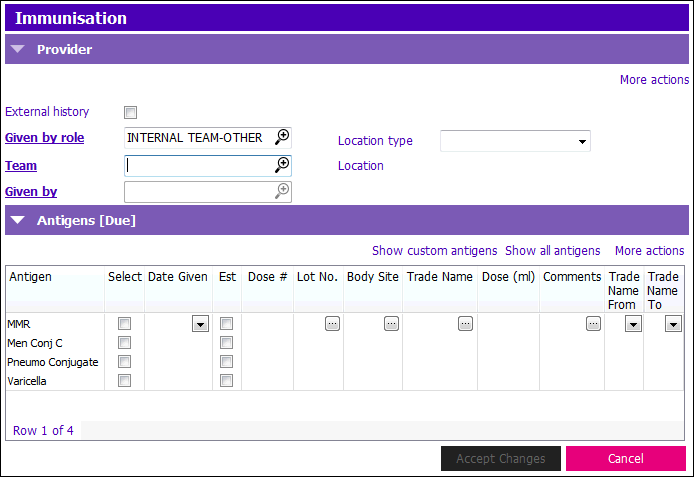
To enter immunization history for the three views above, follow the steps below:
1. Navigate through the following fields using the Tab key:
- Date Given: Enter date immunization was given. If date is approximate, enter a tick mark in Est check box
- If you only know the month & year the antigen was given - enter last day of that month. Example: 30/05/2004
- If you only know the year, enter Dec 31st of that year. Example: 31/12/xxxx
- Lot No.: Enter if provided. If it’s missing, leave the field blank
- Body Site: If it is known, enter into the field. Leave the field blank if it isn’t identified.
- Trade Name: Enter if known. Leave the field blank if it's not known
- Dose (ml): Record if the history states how much of antigen was given. Do not guess or make it up
- Comments: You can add incidental information such as “Given in Cambodia” or “Written history translated by parent”. You shouldn’t write long notes in this area
2. After Antigen History is added, you will not be able to click Accept Changes until the Provider section is filled out. You will need to check off External history check box in order to Accept Changes and Save the entered Antigens, or you need to enter provider information.
NOTE: If Antigens are entered without any details, and you check off the External history checkbox and click Accept Changes, the Antigen(s) you entered with no details will not be saved
- If you select External History you will only be able to select a B.C. physician
- Leave the Provider Details, fields blank if it was not a B.C. GP
You can save after each row or wait until you’ve entered the entire history. The antigens appear in the Immunization History grid after saving.
Enter Immunizations Given Based on BCCDC Recommended Schedule
To enter immunizations given based on BCCDC recommended schedule:
1. Click Insert a row in the Immunisation History section and the Immunisation window will appear:
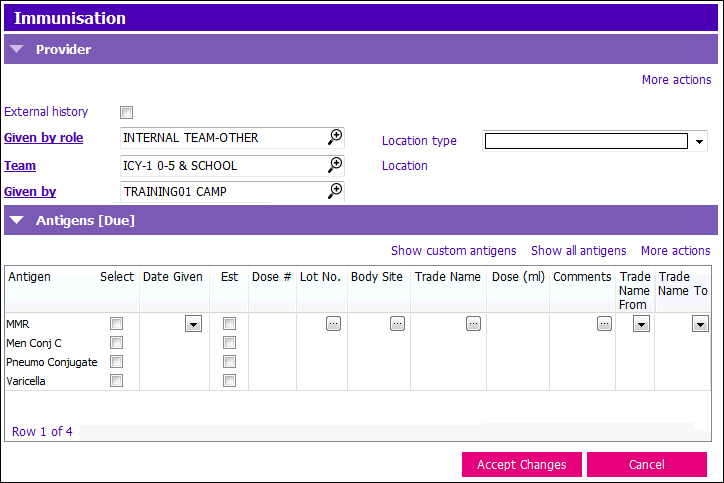
NOTE: You must record immunizations given before entering Provider information
To enter immunization history for the three views above, follow the steps below:
1. Navigate through the following fields using the Tab key:
- Date Given: Enter date immunization was given. If date is approximate, enter a tick mark in Est check box
- If you only know the month & year the antigen was given - enter last day of that month. Example: 30/05/2004
- If you only know the year, enter Dec 31st of that year. Example: 31/12/xxxx
- Lot No.: Enter if provided. If it’s missing, leave the field blank.
- Body Site: If it is known, enter into the field. Leave the field blank if it isn’t identified.
- Trade Name: Enter if known. Leave the field blank if it's not known.
- Dose (ml): Record if the history states how much of antigen was given. Do not guess or make it up.
- Comments: You can add incidental information such as “Given in Cambodia” or “Written history translated by parent”. You shouldn’t write long notes in this area
2. After Antigen History is added, you will not be able to click Accept Changes until the Provider section is filled out:
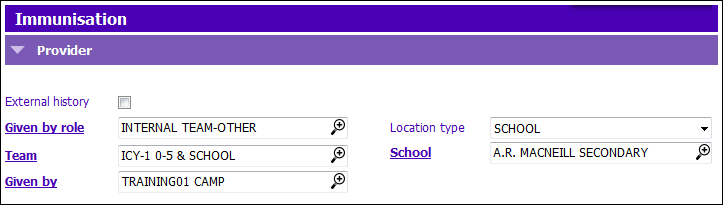
- Given by role: Default is INTERNAL TEAM-OTHER unless External History is ticked
- Team: Select appropriate Team or text your Team code into the field
- Given by: Type in your user name
- Location Type: Select the appropriate location from the picklist
- School: Select the appropriate school from the picklist
3. Click Accept Changes and press F12 to Save. Entry will now show in immunization History grid.

This section is for information only. If you want to see the Alerts, please go to the Immunization Alerts Application.

This section is for information only. If you want to see the Suspensions, please go to the Immunization Alerts Application.