Team Details - View
Team Details - Edit
Team Details - View
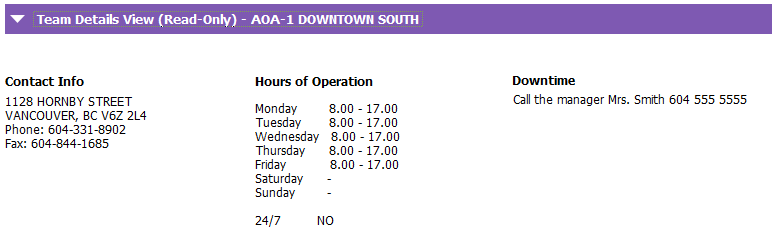
The Team Details View grid is read only. It is used by the PARIS support team to determine if a planned PARIS downtime will impact teams and allows them to identify who to contact from the team before or after a downtime has occurred. Address, contact details, hours of operation and directions about the downtime may be viewed from the Team Details View grid.
Team Details - Edit
PARIS team names are displayed in the header of PARIS reports. If they are incorrect, they may be updated from the Team Details Edit grid.
A team’s hours of operation and downtime instructions may be viewed and edited from the Team Details Edit.
To update a team’s downtime contact and hours of operation, highlight the team you wish to make changes to in the Select Team grid.
Navigate to the Team Details Edit grid and click on Modify Row. Update the fields as required.
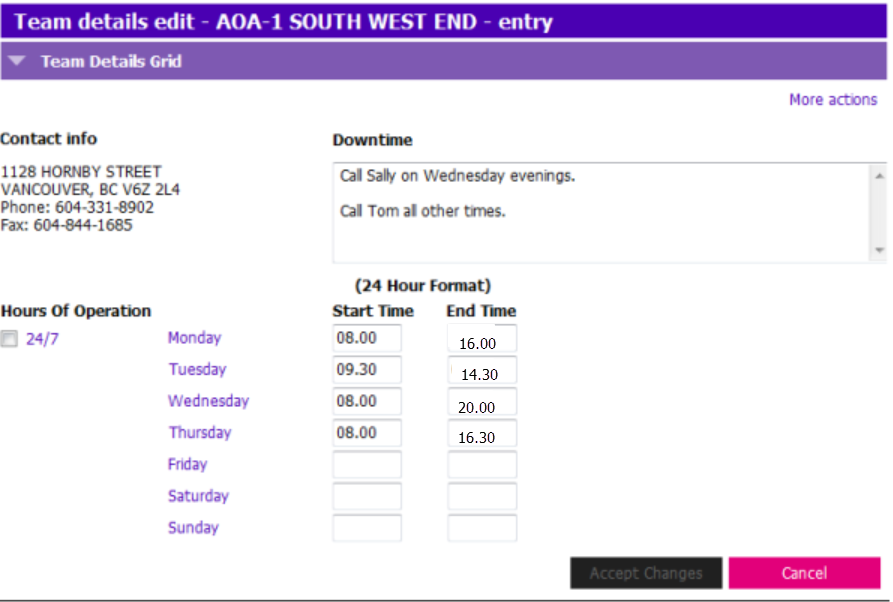
Prior to making any changes, ensure you are editing the details for the correct team. Accept Changes.
Related Links
Team Delegate - Roles and Responsibilities
Remove from Team
Team Delegate List Report
LearningHub
Video - Team Management - Team Delegates
Video - Team Management - Remove From Team - All Staff