This section is only applicable for Home Support Providers who have access to PARIS.
The Confirmed by Provider function is for the Home Support Provider to communicate to the Responsible Clinician that an order has been reviewed and confirmed to go ahead. Confirming an order indicates to the clinician that the provider is able to carry out the order as specified, including the start date (Authorized Start) of service.
Should the provider not be able to carry out the order as specified, it is expected the provider will contact the responsible clinician for further discussion. The outcome may or may not require a revision to the order.
Confirming an order does NOT change the status of the order.
Please note the Provider order confirmation process may vary across sites. As such, certain details may not be applicable to all users. If unsure of your sites practices, consult with local leadership.
To confirm a submitted order (to be done by the Provider only):
1. Select the order to confirm from the forms tree. Orders to confirm will have a status of SUBMITTED or ACTIVE.
2. Scroll to the Service Order Submission section and press the Confirm Order button. Once pressed, Confirmed by Provider will be ticked.
The Confirmed by Provider box is used to support the communication between teams – to inform the Clinician that the Provider has received and has “confirmed” the service will go ahead as ordered. By clicking the ‘Confirm Order’ button and with the Confirmed by Provider ticked, you are confirming the Provider is able to fulfill this order.
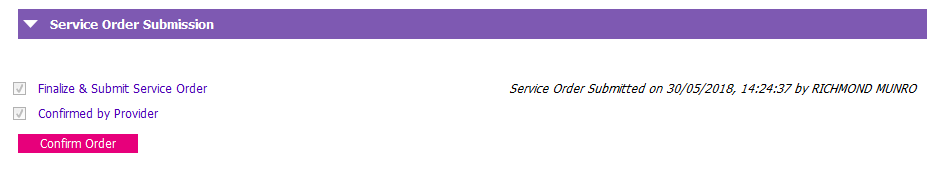 This assumes the provider has reviewed the order and able to carry out the order as specified. Should the provider not be able to carry out the order as specified, it is expected the provider will contact the responsible clinician for further discussion. Do not confirm the order until conversation with the responsible clinician has taken place.
3. SAVE
An automatic PARIS Inbox notification of the confirmed order will go to the Responsible Clinician and the user who finalized and submitted the order. Again, confirming an order does NOT change the status of the order.
Note: Before the service order has been authorized to start, it is possible for the order to be revised, or cancelled by the responsible/ordering clinician. If an order has been revised, you will need to confirm the order again.
If a revision or cancellation occurs, you will be notified via the Provider Notifications Report. See Provider Notifications Report for more information.