The Home Support Orders application contains all Home Support Orders created in this application.
Note: Existing home support clients at the time of go-live will have had their most recent Home Support order from the Assessments application migrated to the HSO application. See Reading a ‘Migrated’ Home Support Order for more information.
All current and historic orders are listed in the forms tree within the application. Orders are organized by Responsible Team, and then by Order Status. Statuses are automatically updated by the system.
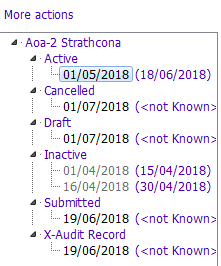
The table below describes the order statuses:
| Order Status | Definition |
| Draft | The HSO is in a draft state and incomplete. |
| Submitted | The HSO is finalized and submitted to the HS Provider, but service has yet to start (i.e. Authorized Start in the future). |
| Active | The HSO is Now active (i.e. service has been authorized to start. |
| Inactive | The HSO is no longer active and is in the past (i.e. Authorized End is in the past). |
| Cancelled | The HSO has been cancelled. |
| Audit Record | This is an audit record that shows past versions of a submitted order, but only if the order has been edited. |
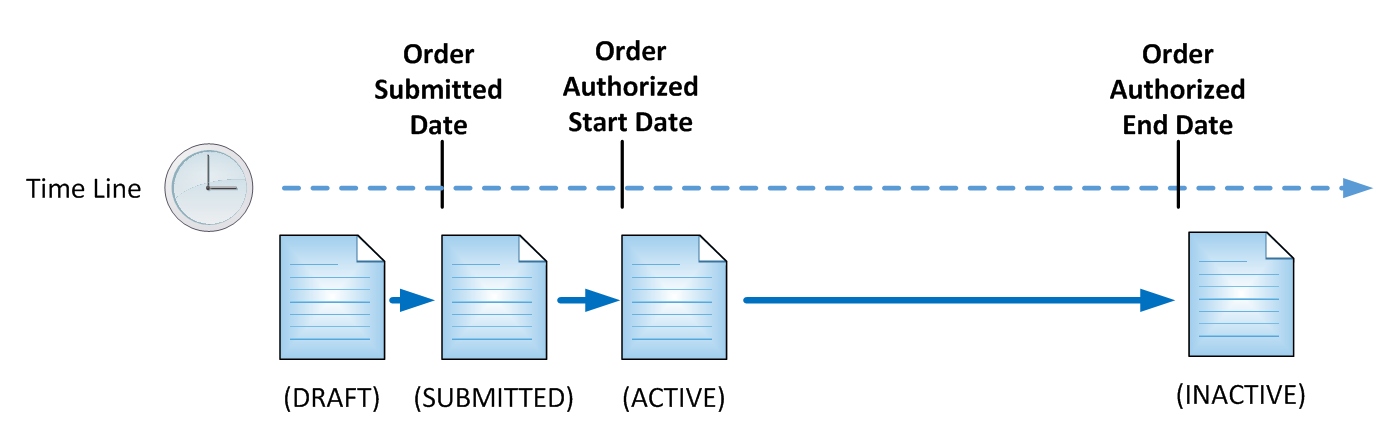
The diagram below illustrates how a typical order changes order statuses over time.
More information
For Providers Only
For Providers Only - Home Support Orders
For Providers Only - Order Status
For Providers Only - Overview of a Completed Home Support Order
For Providers Only - Confirming a Home Support Order
Provider Information Tile
HS Reports