Enter Medication Reconciliation
Modify Medication Reconciliation



Enter Medication Reconciliation
1. In the Medication Reconciliation Application, in the Medications - Reconciliation section, click on Insert a row
2. The Medications - reconciliation - entry window will appear:
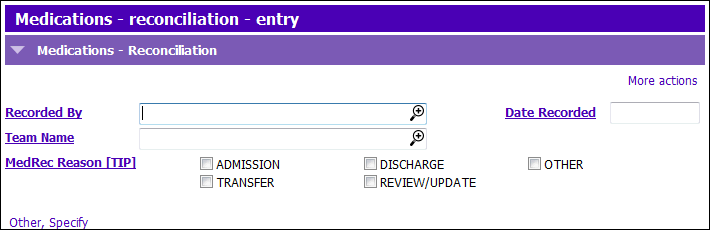
3. Enter the following fields:
- MedRec Reason [TIP]: click in one of the tick boxes beside the 5 different options:
- ADMISSION– Admission to service. OR Beginning of medication management by team. ** MH – Initial “Medication Review” visit.
- TRANSFER–
- DISCHARGE– End of service by team
- REVIEW/UPDATE– Medication updates, reviews or changes.
- OTHER– If checked, Other, Specify becomes a mandatory field and must be entered
4. Check the ‘BPMH Completed’ once you have collected the best possible medication history (update ‘Date Completed’ and ‘BPMH Completed by’ as needed)

5. NOTE: If the MedRec form has been completed by a physician on your team, continue at step 5. If not, complete the Recipient Details by following step a OR b below:
- a) Check the ‘Click Tick Box to Bring GP/NP Details’ field to autofill the section with the GP/NP details as indicated in Central index.
- b) (NOTE: the tickbox must be unticked if you are typing in the information) If the recipient is not the GP/NP as indicated in Central Index, type the recipient’s name in ‘MedRec Form Sent To’. Complete the fields of ‘Telephone’, ‘Fax’ and ‘Address’ by typing in the details.
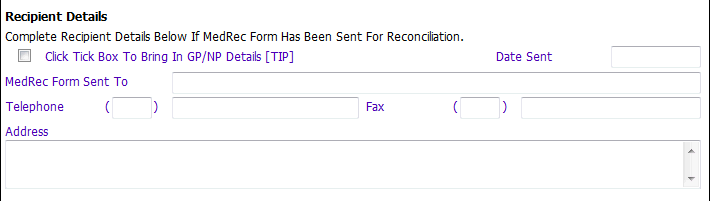
6. Tick MedRec Form Completed when the 3rd column of the paper MedRec form has been completed. (update the Date of Reconciliation as needed and use the date found in the “Medication Reconciliation” Column).
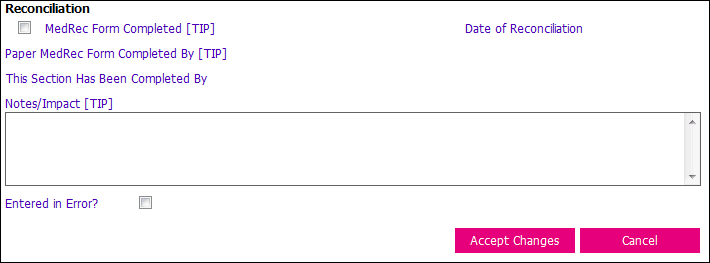
7. Type in the Notes/Impact field as needed, such as to indicate where the medications have been updated (ie. medication application, paper chart).
8. Click Accept Changes & press F12 to Save
Modify Medication Reconciliation
1. Find and select the row you wish to modify in the grid and click Modify row in the Medications - Reconciliation Grid.
2. Complete the appropriate sections.
3. Click Accept Changes & press F12 to Save.