Break Glass - View Break Glass video
Break Glass Audit Trail - Access the Break Glass Viewer
Related Links
Break Glass is the process used to access a client when your team does not have an open referral for that client. Break Glass is meant for short term access only. When access is required beyond quick ‘need-to-know’ information gathering, or you know you are going to be providing service to the client, then a referral should be created for the client.
Break Glass is NOT appropriate when:
- Service is being provided to a client. In this situation, Log a Referral.
Break Glass DOES NOT appear when:
- You are in the Referral application and use Person Search. If you do not want to create a Referral click No or you'll be in a circular loop that you cannot easily exit because the AIFO referral is no longer available.
- When you have an open Referral for the required client. The record displays for you to review.
- If you do not have Restrict Caseload access.
Break Glass - View Break Glass video
To break glass for a client you do not have access to:
1. Search for the client using the Central Index Person Search.
The Person Search form displays.
2. Enter the PARIS ID or next best search criteria and click Search.
3. Select the client record to view.
The Break Glass window displays when you and your team do not have an open referral for the client.
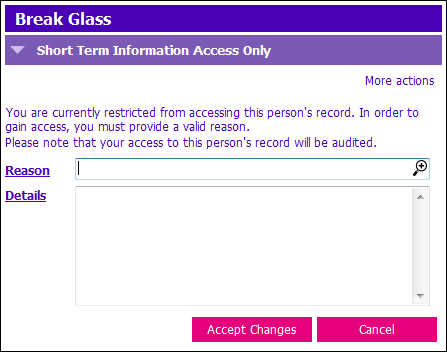
4. Select the Reason magnifying glass icon to the right of the Reason field.
The Break Glass reasons pick list displays.
5. Choose one of three Reasons:
- Clinical Access
Client information for any clinical purpose such as:
to identify if a client is at risk for abuse/neglect, if they are appropriate for service, or to retrieve a past clinical information - Non-Clinical Access
Client information for non-clinical purposes such as:
quality improvement, research, data collection and/or health record management. - System Support
Client information for the purpose of supporting users with technical help such as:
a user calls their Clinical System Support Educator and he/she requires access to the client’s record in order to assist or troubleshoot
6. In the Details field document:
- The information you are seeking from the client record
- Who is needing the information
- Why the information is required
7. Click Accept Changes once you enter complete details.
The Client record now displays for you to retrieve the required information.
Break Glass short-term access is maintained during the time you remain in the client’s chart. When you successfully Break Glass and access a restricted client you are allowed access to that client’s chart until you navigate to a different client. When you need to access the restricted client again, you must Break Glass again.
Logging out of PARIS terminates the Break Glass session. To see the restricted client’s chart again you must Break Glass again.
When you Break Glass, each event is recorded and can be viewed with the Break Glass Viewer. The viewer displays: who broke glass, when, and why the client was accessed. This information is audited.
Break Glass Audit Trail - Access Break Glass Viewer
The Break Glass Viewer allows anyone to see who has accessed a client via Break Glass. The viewer displays:
- who accessed the client
- when access occurred
- the reason access occurred
- the details as to why access occurred
1. Select the Client Info tile. The Break Glass Viewer tile displays.
2. Click the Break Glass Viewer application tile.
3. Search and open the client's record.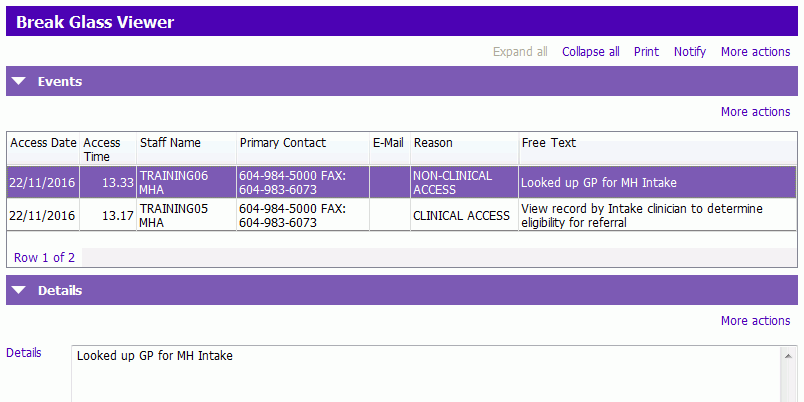 NOTE: Accessing the Break Glass Viewer triggers the Break Glass Process unless you have:
- an open referral for the client
- the client currently open
- unrestricted access
Related Links
Break Glass Tip sheet