Duplicate Alert
Entered in Error
Duplicate Alert
If the same Alert has been entered twice:
You will not be able to remove either. Fax the following form to PARIS: http://communitysystems.vch.ca/published/UR_-_Delete_a_Duplicate_Alert_(VCH).pdf
Entered in Error
If an Alert was logged on the wrong record/does not apply to this client:
1. In the Central Index application, Personal Details form, Alerts section; Click to select and highlight the erred Alert in the Alerts grid.
2. Click Modify row and the Alert entry window appears:
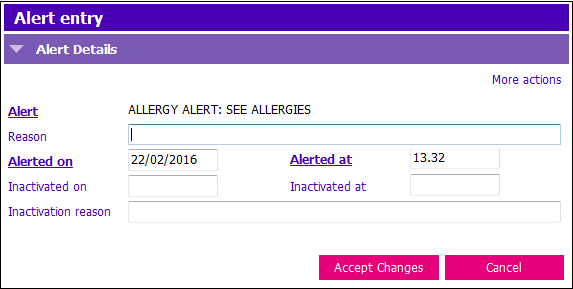
3. To mark the alert entered in error, update the following fields:
- Reason: Remove any text entered into this field
- Inactivated on: Enter the date the alert was inactivated on. If the alert is dated earlier than today: enter the same date as in the Alerted on field. If the Alert was entered today: enter today’s date.
- Inactivation reason: Type in ‘Entered in Error’
4. Click Accept Changes & F12 to save.