** The following steps should be completed by the clinician providing Telephonic Care**
The below steps should be completed in PARIS after the first telephonic call is made by the clinician providing Telephonic Care.
1. Allocate the clinicain providing Telephonic Care to the appropriate referral.
- Type of Allocation: Key Provider
- Allocation Status: Active-Self Management Support
2. Ensure other allocations are updated if necessary
3. Open the Patient Focused Funding grid. The Patient Focused Funding grid can be found in Funding/Eligibility in the Central Index application or within the Casenote application (Progress Notes).

4. Click on Insert a row to indicate the client has transitioned to Telephonic Care. The Patient Focused Funding- entry window will appear:
NOTE: This is important for reporting and funding.
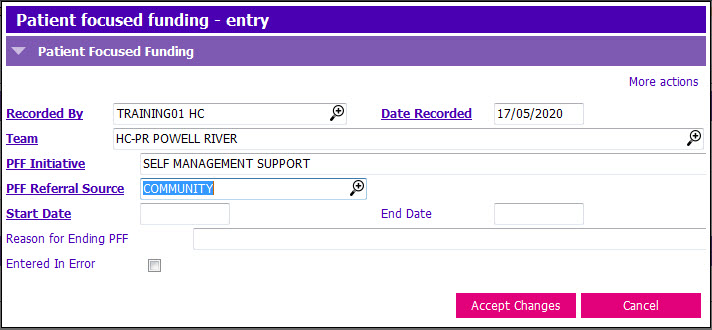
5. Enter the following fields:
- Team: Click the
 to launch the picklist and select the appropriate team
 - PFF Intiative: Click the
 to launch the picklist and select SELF MANAGEMENT SUPPORT
 - PFF Referral Source: Click the
 to launch the picklist and select an appropriate Referral Source (e.g. Community)
 - Start Date: Enter the date that the client transitioned to Telephonic Care
6. Click Accept Changes & F12 to Save.
7. The clinician providing Telephonic Care should document casenotes as appropriate using the following:
- Type: PROGRESS NOTE
- Reason: SELF MANAGEMENT SUPPORT
The below steps should be completed in PARIS when a client is being discharged/transitioned from the Telephonic Care stream.
1. Open the Patient Focused Funding grid from either Casenotes (Progress Notes), or Funding/Eligibility in the Central Index.
2. Select the existing SELF MANAGEMENT SUPPORT grid row.
3. Click Modify row and the Patient focused funding - entry window appears:
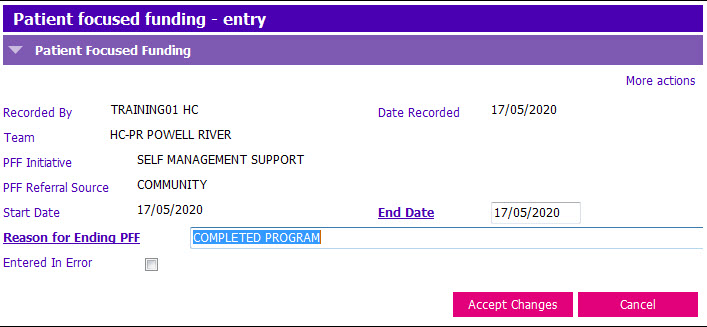
4. End date the grid row to indicate the client has been Discharged/Transitioned from Telephonic Care.
NOTE: this is important for reporting.
5. Update the following fields:
- End Date: Date the Client was Discharged/Transitioned from Telephonic Care. Reason for Ending PFF field then becomes mandatory
- Reason for Ending PFF: Click the
 to launch the picklist and select the appropriate reason:
- COMPLETED PROGRAM: Use when the Client is discharged from Telephonic Care Management/Goals are Met
- OTHER: Use when the Client is transitioned back to Home Health services
8. Accept Changes and press F12 to Save.
9. The clinician providing Telephonic Care should document casenotes as appropriate.