Access the Assessment Tools Application
Braden Risk and Skin Assessment

The PARIS Assessment Tools Grid provides a single location in PARIS for clinicians to document quantitative tool results. Clinicians can record assessment tool results, comments and upload an electronic version of the tool. This allows you to compare scores over time.
 Always be aware of program, site or discipline-specific standards for the documentation of assessment tools. Those standards may provide specific detail on certain scenarios and processes. Always be aware of program, site or discipline-specific standards for the documentation of assessment tools. Those standards may provide specific detail on certain scenarios and processes. |
View the Introduction to Assessment Tools demonstration
Access the Assessment Tools Application
The Assessment Tools application is located within the home tiles of Clinical Info and Shortcuts.
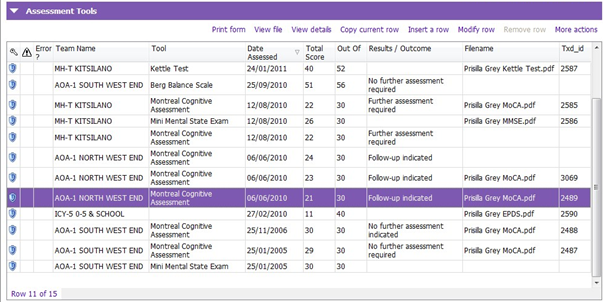
The grid provides: the tool name, date of assessment, total score, results, the team the tools were recorded against, and the file name of the uploaded assessment tool that was administered.
|
Only a few Assessment Tools are not located in the Assessment Tools Application, such as The HONOS, Substance Use Assessment and Nursing Priority Screening tools are located in the Assessments Application. General rule is to always start in the Assessment Tools Application. Only when you cannot find the Assessment Tool you are looking for should you look in Assessments. |
Braden Risk and Skin Assessment
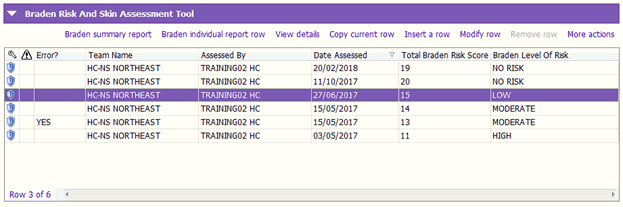
The Braden Risk and Skin Assessment is a tool used by clinicians to determine the level of risk a client developing a pressure injury. All Braden entries created will push the Total Braden Risk Score and Braden Level of Risk into the Assessment Tools grid.
 Braden Risk and Skin Assessments cannot be created nor marked ‘Entered in error’ in the Assessment Tools grid. This must be done using the Braden Risk and Skin Assessment Tool grid. Braden Risk and Skin Assessments cannot be created nor marked ‘Entered in error’ in the Assessment Tools grid. This must be done using the Braden Risk and Skin Assessment Tool grid. |
Related Links
Grid Filters
Introduction to Assessment Tools demonstration video