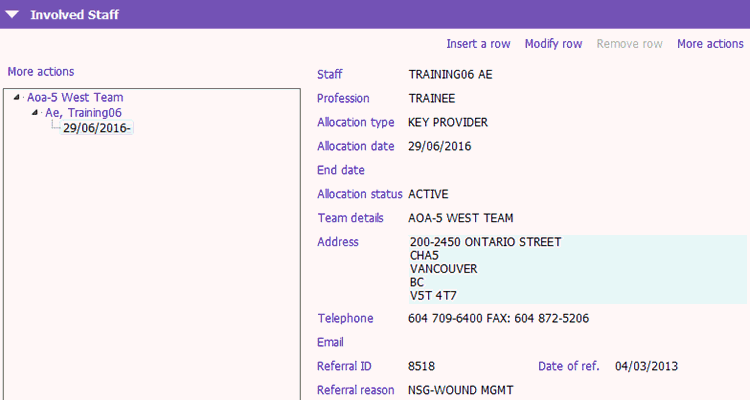
The Allocation / Association application allows you to either allocate or associate yourself or your staff to a client (add the client to a caseload) or indicate that you or your staff accesses/accessed the record. Examples would be:
- Allocate a referral to one or more clinical providers to add the client to their caseload(s).
- Associate Self to indicate you opened the record to view information, or are a casual and do not carry a caseload (e.g. clerical staff or casuals).
- Associate another staff member as Other Provider when staff member knows for sure that another staff member will be accessing record (e.g. when assigning casual staff).
Allocation can be done from a number of Applications in PARIS
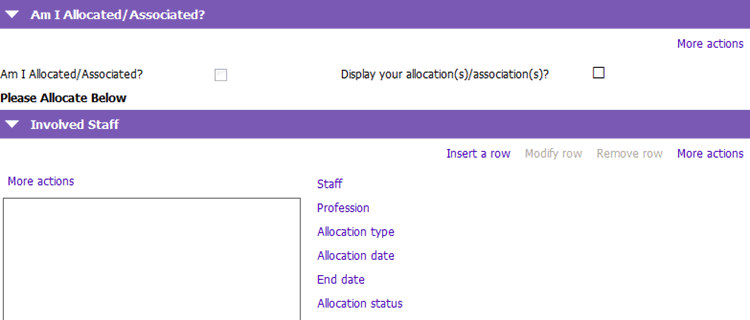
1. View the Am I Allocated/Associated tickbox. If it is not checked you are not yet allocated.
2. Click 'Insert a row' on the Involved Staff menu.
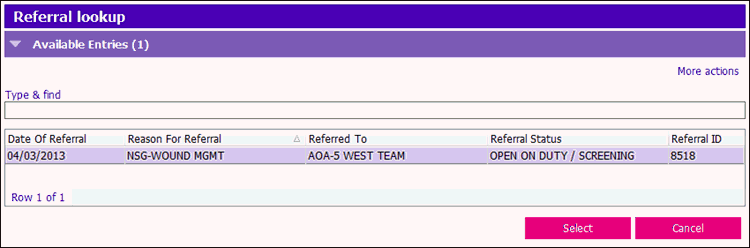
3. Select the referral in the Referral lookup window.
 4. The Allocation details window appears:
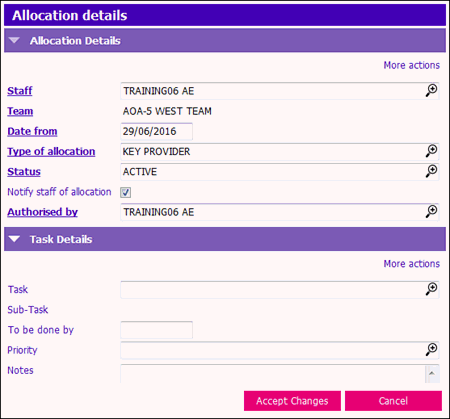
5. Complete the following fields:
- Staff: Click on the
 or press F4 to search for the appropriate team member
 - Team: Defaults to your Team
- Date from: Defaults to today's date
- Type of allocation: Click on the
 or press F4 to select the appropriate allocation type
 - Status: Click on the
 or press F4 to select the appropriate allocation status
 - Notify staff of allocation: Tickbox defaults to ticked and sends the allocated member a notification message to notify the allocation
- Authorised by: Defaults to your name
6. Click Accept Changes and then save the form.
The newly allocated team member should appear under involved staff for your team with the date of their allocation below their name.