When to mark a Casenote as Entered in Error
Group Casenotes: Entered in Error
When to mark a Casenote as Entered in Error:
- Wrong Casenote Type was selected and saved
- Right Casenote Type but wrong client
- Copied Casenote to Wrong Client
- Casenote attached to Wrong Team
- Copied or Logged Casenote twice (or more)
1. Click on the erroneous Casenote and update the Reason field in the Header section:
- Reason: Change to Entered in Error (EIE) by clicking the
 and selecting ENTERED IN ERROR in the Case note reason lookup window
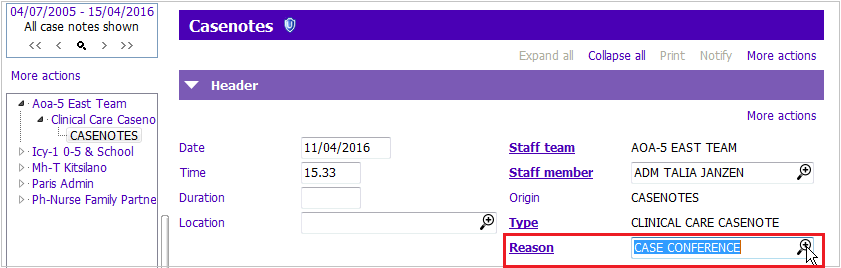
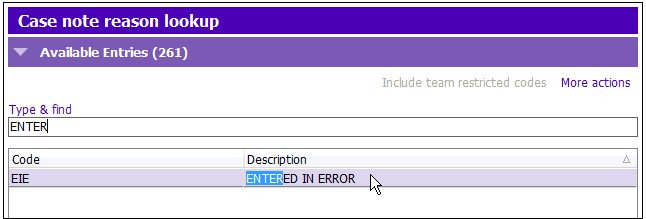
2. Highlight Text, press delete, type Entered in error – you cannot delete your signature stamp or any part of it.
3. Press F12 to Save.
NOTE: Casenote will NOT be counted statistically
Group Casenotes: Entered in Error
1. Edit the Casenote as necessary and update the Reason field:
- Reason: Change to “Entered in Error”
2. Click  button, to remove the Group link
3. Select Show Associated Group Details
4. Highlight the client whose Casenote you wish to remove from the Group
5. Click Remove a row and click Yes to the confirm window “Do you wish to remove selected person from the Group?”
6. Click Accept Changes for ‘Associated Group details’ window
NOTE: Once the link is removed, the Casenote is no longer associated with the group but is not deleted from the clients record